
Once you have completed the tutorial training videos please complete and submit the practical test and quiz items below. Completion of this test and quiz ensures that you have spent time watching the training videos and can be added as an Authorized User with clearance to receive on-going support on the CMS from ePageCity.
If you have not received your website login credentials, please contact an ePageCity representative before beginning the practical test and quiz below.
Practical Test
Please complete this short practical test by following the steps as detailed below on your site before submitting your quiz question answers. The practical test should take you no more than 5-15 minutes to complete.
In this step you will need to create a basic page on your site and demonstrate how to lay out content. You will need to set the page as a Draft, so that site viewers cannot see this on your live site! If you do not know how to do so, review this video again before proceeding. Do not save this page as Published content.
Instructions
- Create a basic page on your website.
- Set the name of the page as “Name CMS Quiz Page”. Enter your full name for Name.
- Add the following content to the page
Add this paragraph as basic text:
This is my training page. Lorem ipsum this is a link, no sea takimata sanctus estempor invidunt ut labore et dolore magquyam erat, sed diam voluptua. At vero eoet accusam etduo dolores et ea rebum. Stet clita kasd gubergren, no seamatasanctus est Lorem ipsumgubergren, no seamata sanctus sadipscing elitr, this is a link when it is rolled over tempor. sanctus est Lorem sumgubergren, no seamata sanctus
Add a line of text styled as Heading 2.
Heading 2 dolore magna aliquam erat volutpat.
Add a bulleted list with the following items:
Alpha
Beta
Gamma
Delta
Epsilon
- Add an image to the page
- Set the width of the image to 200px wide.
- Insert it next to the paragraph, aligned to the right.
- Set the left image margin to 10 and the top and bottom image margins to 5.
- Add a link to an external site
- The link text should read “Click Here to Visit Google”
- The link should open in a New Window
- Link to http://www.google.com
- Add a link to a page within your site
- The link text should read “Visit our Homepage”
- The link should open in the same window.
- Link to your Website’s homepage (“Home”)
- Upload a document and provide a link to download it.
- The link text should read “Click to Download File”
- The link should open in a New Window.
- Save the page as a ‘Draft’.
- Set the page to be a sub-page underneath your website’s ‘Contact Us’ page.
- Save the page.
- Add an Image Gallery to the page you have just created with at least 2 images. The gallery should be displayed directly below the Content area.
- Add a Video beneath your image gallery using this embed code. The video should be displayed at the bottom of the page.
<iframe src="//player.vimeo.com/video/69184192" width="500" height="340" webkitallowfullscreen mozallowfullscreen allowfullscreen></iframe>Your completed page should look like this:
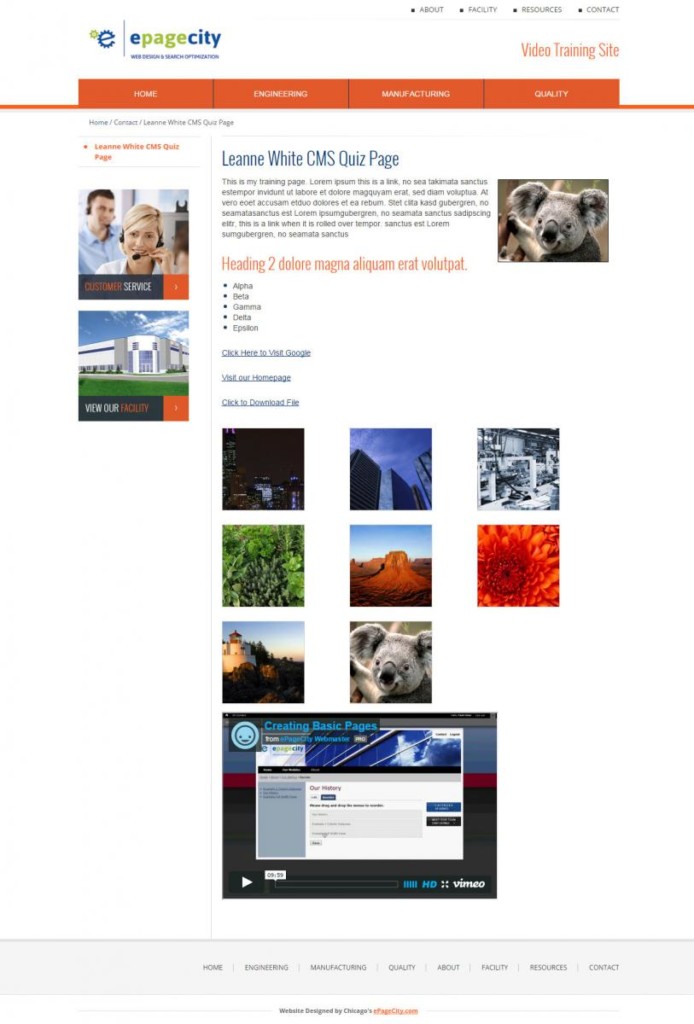
Once this practical test is complete please move on to the quiz below. Please do not further edit or delete the practical test page you created on your site – this page will be deleted by an ePageCity representative after your Q&A session as detailed below the quiz.
Quiz
This quiz should take you no more than 5-15 minutes to complete. While completing this quiz we strongly suggest that you have your website and content management system open in a separate window for easy reference.
"*" indicates required fields
Practical Test and Quiz Submitted?
Once this quiz is submitted an ePageCity representative will review the practical test page on your site and quiz answers and will be in touch to schedule your Q&A session. This session will be held over the phone and through the use of our screen-sharing software, Zoom. During the Q&A we will:
- Walk through any features not covered within the tutorial videos
- Walk through any custom components/features that are unique to your website
- Answer any questions you may about the CMS